
Your SSL certificate does its job. The trouble is everything people read into the padlock: users, clients, agencies and SEO checklists alike. Here is what it really protects, and what it never promised to.
On the night of Sunday, October 11, 2026, someone turned the freezers of hundreds of French supermarkets into ovens. Managers opening their stores on Monday morning were hit by a blast of hot air. Intermarché said some of its units had sat at 50°C for six hours. Coopérative U, Carrefour, Monoprix and others reported the same, and the BBC counted about 400 stores affected.
The attackers had taken over the software that stores use to manage their refrigeration remotely, made by the Danish company Danfoss, and ordered the units to heat up and stay hot. Danfoss said the affected equipment was an older generation that couldn’t be updated against a risk it had already identified. The Paris prosecutor opened a cybercrime investigation.
Nobody intercepted a packet. Nobody broke any encryption. They didn’t need to, and that’s the best way I know to start talking about what an SSL certificate actually protects.
The argument I keep having
A recent argument about SSL went something like this. I took the cynical side on purpose.
My case: SSL certificates used to mean something. To get one, you had to prove you were a real person or a real company, with a real address, and the certificate belonged to someone. Today anyone gets one with a click, or for free from Let’s Encrypt in a few seconds. Meanwhile, attacks haven’t slowed down at all. So what is the padlock actually doing for anyone?
And the part I cared about most: why would an attacker bother intercepting a thousand transactions one by one when they can take over the system that processes all of them? SolarWinds. Kaseya. MOVEit. Ransomware in hospitals. Now supermarket freezers. Encrypting the connection while the endpoints are wide open felt like posting a tank to guard a faucet while someone walks off with the dam.
I still like that image. But after thinking it through, I have to admit I was half wrong, and the half I got wrong is what makes the other half worth writing about.
What does an SSL certificate actually do?
A quick naming note first. SSL was retired years ago, and what your site runs today is TLS, its successor. Everyone still says “SSL certificate”, me included, so I’ll use both.
TLS does three things:
- Encryption. Nobody between the visitor and the server can read what they exchange.
- Authentication of the domain. The browser checks that the server holds a valid certificate for the domain in the address bar.
- Integrity. Nobody in the middle can quietly change what’s sent, in either direction.
The best analogy I’ve found is a phone call.
TLS guarantees that you reached the number you dialed and that nobody is listening in. It doesn’t tell you whether that number belongs to your bank.
That last part is where the confusion lives. There are three levels of certificate validation. Domain Validated (DV) certificates, like the free ones from Let’s Encrypt, only prove that someone controls the domain. Organization Validated (OV) and Extended Validation (EV) certificates add checks on the company behind it. None of them says whether that company is honest, and the encryption is exactly as strong in all three.
Where I was half wrong
The faucet was being robbed, and a lot.
Before HTTPS was the default, intercepting traffic wasn’t a sophisticated attack. It was a browser extension. In 2010, Firesheep let anyone on a café’s Wi-Fi take over other people’s Facebook and Twitter sessions with a click. Internet providers did it at scale and called it a product: Verizon injected a tracking header into every unencrypted site its mobile customers visited, and Comcast inserted its own notices into pages people were reading.
In 2015, China used what researchers named the Great Cannon to inject code into unencrypted traffic headed for Baidu’s servers, turning ordinary visitors’ browsers into a weapon against GitHub.
Attackers stopped bothering with the faucet largely because it got locked, and my argument missed that for a reason Abraham Wald would have recognized. During World War II, his work for Columbia’s Statistical Research Group estimated how vulnerable bombers were from the damage on the planes that came back.
The lesson everyone remembers is simple: the places with no bullet holes were the places where a hit meant the plane never returned. (The famous diagram of a plane covered in red dots came decades later and isn’t Wald’s; the real story is more mathematical and less tidy.)
I had done the same thing with attacks. I looked at the ones that succeed today, saw that almost none involve intercepting traffic, and concluded that protecting traffic was pointless. But interception is missing from that sample for a reason. That’s where the armor already is.
There was also something I’d overlooked entirely. TLS protects integrity, not only secrecy. Without it, anyone on the network path can rewrite your pages on their way to your visitors. Your site becomes part of somebody else’s dam.
My point about identity needed correcting too. Cheap, domain-only certificates existed long before Let’s Encrypt. Extended Validation was introduced around 2007 precisely to bring identity back, and it didn’t hold either.
In December 2017, researcher Ian Carroll incorporated a company called Stripe, Inc. in Kentucky and used it to obtain a fully valid EV certificate. In the address bar, his site looked almost exactly like Stripe, the payments company. When the certificate authority revoked it months later, it ended up apologizing and admitting the revocation had been a mistake. The system worked as designed. The design just didn’t mean what people thought it meant.
Where I was right: the dam
Now the other half.
SolarWinds, Kaseya and MOVEit share a pattern: the attackers went after one supplier and reached thousands of organizations downstream. The MOVEit flaw was a SQL injection (CVE-2023-34362) that could be exploited over HTTP or HTTPS alike. Encryption had nothing to say about it.
The web has its own versions, and in each one the padlock stayed on the whole time.
British Airways, 2018. Attackers slipped 22 lines of JavaScript into the airline’s website. For about two weeks, card details typed into a perfectly encrypted checkout were copied to a server at baways.com. That domain had its own certificate, a paid one, reportedly chosen over a free one so the server would look more legitimate. When the certificate authority revoked it, its statement made my argument better than I could: it had followed every industry rule, and certificate authorities cannot know in advance what someone intends to do with a certificate. British Airways said around 380,000 transactions were affected.
polyfill.io, 2024. A JavaScript service embedded in more than 100,000 websites changed hands, and the new owner started serving code that redirected visitors to scam sites. Every affected site kept its valid certificate. The defense that would have helped is Subresource Integrity, a W3C standard that lets a page refuse a script that has been altered. It has nothing to do with TLS.
The padlock with a gap. Some CDN setups encrypt the trip from the visitor to the CDN and leave the rest in plain text. Cloudflare’s own documentation says its “Flexible” mode makes a site “partially secure”: encrypted up to Cloudflare, plain HTTP from Cloudflare to your server. The visitor sees the same padlock either way.
And then there’s Danfoss. The equipment that was hit couldn’t be patched. Meanwhile, the industry is shortening certificate lifetimes on a fixed schedule: in April 2025 the CA/Browser Forum voted, with every major browser in favor, to cut the maximum from 398 days to 200 in March 2026, 100 in 2027 and 47 by March 2029.
We’re renewing the lock on the faucet every few weeks while the dam runs software nobody can touch.
The padlock was a UX problem all along
This is the part I’ve been circling for almost twenty years.
Around 2008 I wrote a paper on the gap between perceived security and real security. I later took it down, because parts of it had aged badly and I no longer agreed with them. In 2017 I came back to the subject in a series on UXpañol, closing with a piece on how more security can mean less security. It included a study we ran with 48 users of bank coordinate cards: 71% of those who’d used one for more than a year had been locked out of their account at least once, and 85% couldn’t explain how a card they carried right next to their bank card protected them at all.
That piece was about one way security fails people: friction. Make security heavy enough and people route around it. They write passwords down, reuse them, carry the card and the code together.
The padlock is the other way: the signal. Show people a security indicator they don’t fully understand, and they’ll read more into it than it says. Attackers know this better than most designers do.
None of this is new, which is what makes it frustrating. In 1999, Anne Adams and Angela Sasse argued that users are not the enemy: when people break security rules, the design is usually to blame. In 2006, Dhamija, Tygar and Hearst found that good phishing sites fooled 90% of their participants, and almost a quarter never looked at the browser’s security cues at all. A year later, Schechter and colleagues removed the HTTPS indicators from a bank’s login, and not a single participant held back their password.
In 2009, Cormac Herley showed that ignoring security advice is often the rational choice: a minute a day spent checking URLs would cost users far more time than phishing ever costs them in money. The research was there. The industry kept telling people to look for the padlock.
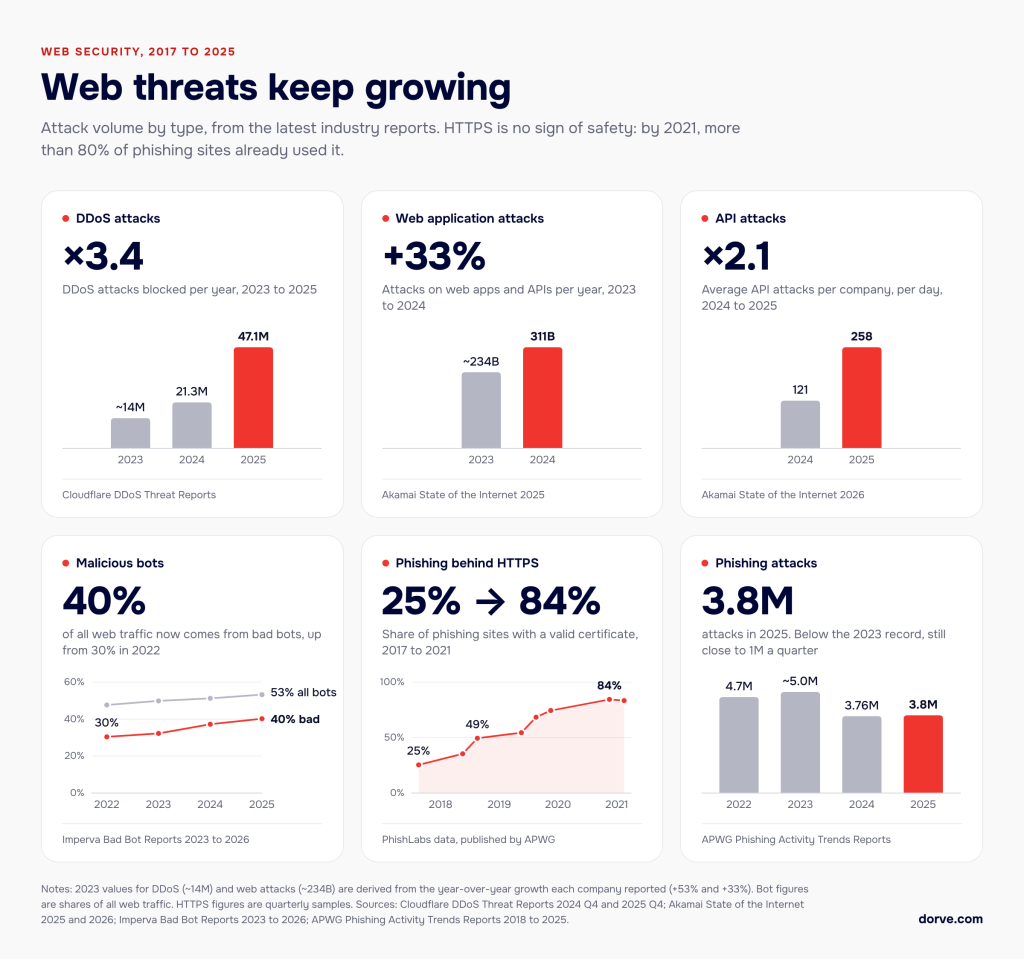
Then the attackers moved in. Reports from the Anti-Phishing Working Group (2017, 2021) show how quickly phishing followed the rest of the web to HTTPS:
In June 2019 the FBI warned the public not to trust a site just because it shows a padlock.
That same year, a team led by Katharina Krombholz published a study with a title I wish I’d written: “If HTTPS Were Secure, I Wouldn’t Need 2FA”. Users confused encryption with authentication, underestimated what HTTPS actually protects, and ignored or distrusted the indicators anyway. Reading it now, I recognize my own opening argument in their interviews. Also in 2019, researchers at Google showed that the EV indicator didn’t change how people behaved, and browsers stopped showing it in the address bar.
In 2021, Google’s own research found that only 11% of participants understood exactly what the padlock meant. People used it to judge whether an online store was trustworthy. In September 2023, Chrome 117 replaced the padlock with a neutral settings icon.
One more turn of the screw. Phishing doesn’t only borrow the look of security, it borrows its voice. “We detected unusual activity, please verify your account” is one of the oldest lures there is. We trained people to obey security warnings, and attackers dress up as security warnings. That’s security theater working for the other side.Simply put, we’re dealing with what is known as survivorship bias.
Consider this well-known example from Abraham Wald’s research. Many engineers proposed reinforcing the parts of aircraft where bullet holes were found. Wald demonstrated that those were precisely the planes that had survived and made it back. The planes that didn’t return were likely hit in other, more vulnerable areas.
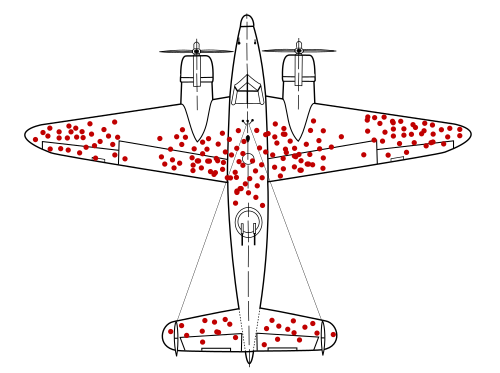
This is a well-known concept studied in economics, sociology, technology, and many other fields.
So, how does this relate to the false sense of security? Many people have secured their websites with SSL/TLS, which is perfectly fine, don’t get me wrong. The problem is that encryption protects data in transit, not the systems at either end of the connection. You can have a perfectly encrypted connection and still be vulnerable to compromised servers, insecure CMSs, vulnerable software, infected personal computers, banking fraud, and insecure IoT devices.
Is HTTPS still an SEO ranking factor?
For years, agencies sold SSL as an SEO upgrade. In 2014 Google announced HTTPS as a ranking signal, and the industry ran with it. What Google actually described was a very lightweight signal, affecting fewer than 1% of queries.
Today, Google’s page experience documentation still lists “are your pages served in a secure fashion?” as a self-assessment question. It also states that, apart from Core Web Vitals, the other page experience aspects don’t directly help a site rank higher. By Google’s own account, the ranking boost agencies sold for a decade isn’t a direct factor anymore.
What HTTPS does for search now is more practical, and in some ways it matters more:
- Access. With Chrome 154, rolling out this month, Chrome asks for the user’s permission before the first visit to any public site without HTTPS. An HTTP site now has a warning standing between it and the visitors arriving from search.
- Canonicalization. Google prefers the HTTPS version of a page as canonical, unless something gets in the way: an invalid certificate, insecure dependencies, redirects back to HTTP. A half-finished migration creates duplicates.
- Speed. Browsers only speak HTTP/2 and HTTP/3 over TLS. Those protocols help pages load faster, and load speed feeds Core Web Vitals, which do count.
- Data. When a visitor goes from an HTTPS page to an HTTP one, the browser drops the referrer by default. HTTP sites lose attribution for the traffic sent their way.
- Uptime. An expired certificate puts a full-page browser warning in front of your site. With lifetimes heading to 47 days, certificate renewal has become an availability issue.
And here’s the part that ties back to everything above. When Google talks about trust, it means reputation: who is behind a site, what their track record is, what others say about them. Trust sits at the center of E-E-A-T, and Google’s Search Quality Rater Guidelines give it a lot of room. The padlock was never part of that. SEO checklists that treat HTTPS as a trust signal make the same mistake users do.
What actually works: take the human out of the check
If twenty years of research say people can’t reliably judge security from a signal, a better signal won’t save us. What helps is designing systems where the safe outcome doesn’t depend on that judgment.
Passkeys are the clearest example I know. A passkey, built on the W3C Web Authentication standard, is cryptographically tied to the domain it was created for. On a lookalike site it simply doesn’t work, no matter how convinced the user is that they’re on their bank’s page. The browser checks the domain, so the person doesn’t have to. A good password manager does a smaller version of the same thing: it won’t autofill on a domain it doesn’t recognize, and that silence is a warning no phishing page can fake.
There’s a small irony here for me. In June 2017, the same month my UXpañol piece came out arguing against forced password rotation and arbitrary complexity rules, NIST published SP 800-63B, which told organizations to stop requiring both. Not everything in that article aged as well. I recommended mnemonic passwords, and today I’d tell you to use a password manager and passkeys instead. But the direction was right: stop making people do work the system should do.
The same principle applies beyond logins:
- Make third-party code verifiable. Subresource Integrity, a Content Security Policy, and an inventory of every script your pages load.
- Make systems patchable. Equipment or software that can’t be updated is a liability with a delay attached.
- Design for the moment something goes wrong. In France, store managers found out when they opened the freezers. Who gets alerted when your system does something absurd, how fast, and through which channel? That’s a design question before it’s a security question. It also changes what you count: “no incidents” usually means “no incidents detected”, and SolarWinds went unnoticed for months.
The faucet is fine. Watch the dam.
So what does SSL actually protect? The conversation between your visitor and your server, and it does that job well. It doesn’t protect your server, your plugins, your third-party scripts, your suppliers or your users’ judgment. It never promised to.
The French freezers had nothing to do with websites and everything to do with this post.
The lock was on the faucet. Nobody was watching the dam.
Frequently asked questions
It secures the connection, not the website. An SSL/TLS certificate encrypts traffic, lets the browser confirm it reached the right domain and stops anyone in the middle from altering the page. It does nothing to protect the server, plugins, third-party scripts or the people running the site, and it says nothing about whether they are honest.
Because anyone who controls a domain can get a valid certificate, often for free. By early 2021 the Anti-Phishing Working Group found that about 83% of phishing sites used HTTPS. The padlock only means the connection to that domain is encrypted.
Not directly. Google’s page experience documentation says that, apart from Core Web Vitals, page experience aspects don’t directly help a site rank. HTTPS still matters for search: Google prefers HTTPS URLs as canonical, the protocols that speed up pages require it, and Chrome now warns users before opening public sites without it.
Google’s research found that only 11% of people understood what the padlock meant, and many read it as a sign that a site was trustworthy. Chrome 117, released in September 2023, replaced it with a neutral settings icon. Chrome still warns when a connection is not secure.
Measures that don’t depend on users judging a signal. Passkeys are tied to the real domain and don’t work on a lookalike site, password managers refuse to autofill on unknown domains, and Subresource Integrity stops a page from running a third-party script that has been altered.
At Dorve we have been designing digital experiences for nearly three decades, and thinking about how people perceive security for most of that time. If you’d like a second pair of eyes on what your users see and rely on, from login and checkout flows to the scripts your pages load and the signals your interface sends, see what we do or let’s talk.